In today's world, meetings are considered indispensable. They play a pivotal role in fostering collaboration, sparking brainstorming sessions, and guiding decision-making processes that shape project and strategy directions. Yet, it's evident that not all meetings are effective. While intended to be drivers of efficiency and innovation, many unfortunately veer off course, resulting in inefficiency and a lack of productivity. Often, the root causes of these shortcomings are elusive, leaving us with limited data to diagnose and understand the underlying issues.
In response to this challenge, we're thrilled to announce a new integration with Microsoft Office 365 Calendars as part of our latest Premium offering on Poly Lens. This new integration streamlines the activation of Meeting Behavior Insights within Poly Lens. The best part? These meeting behavior insights are supported on all major meeting platforms.
Uncover Insights that can Drive Results
Let's explore a pair of examples showcasing the insights offered by this integration.
Meetings that Started Late
Late-starting meetings often result in wasted time and can disrupt the flow of the workday. This could signal a room technology issue, a training opportunity, or an underlying organizational behavior like back-to-back meeting schedules. By analyzing the reasons behind delayed starts, you can implement solutions that can help correct the issue.
Rooms Scheduled, but Empty
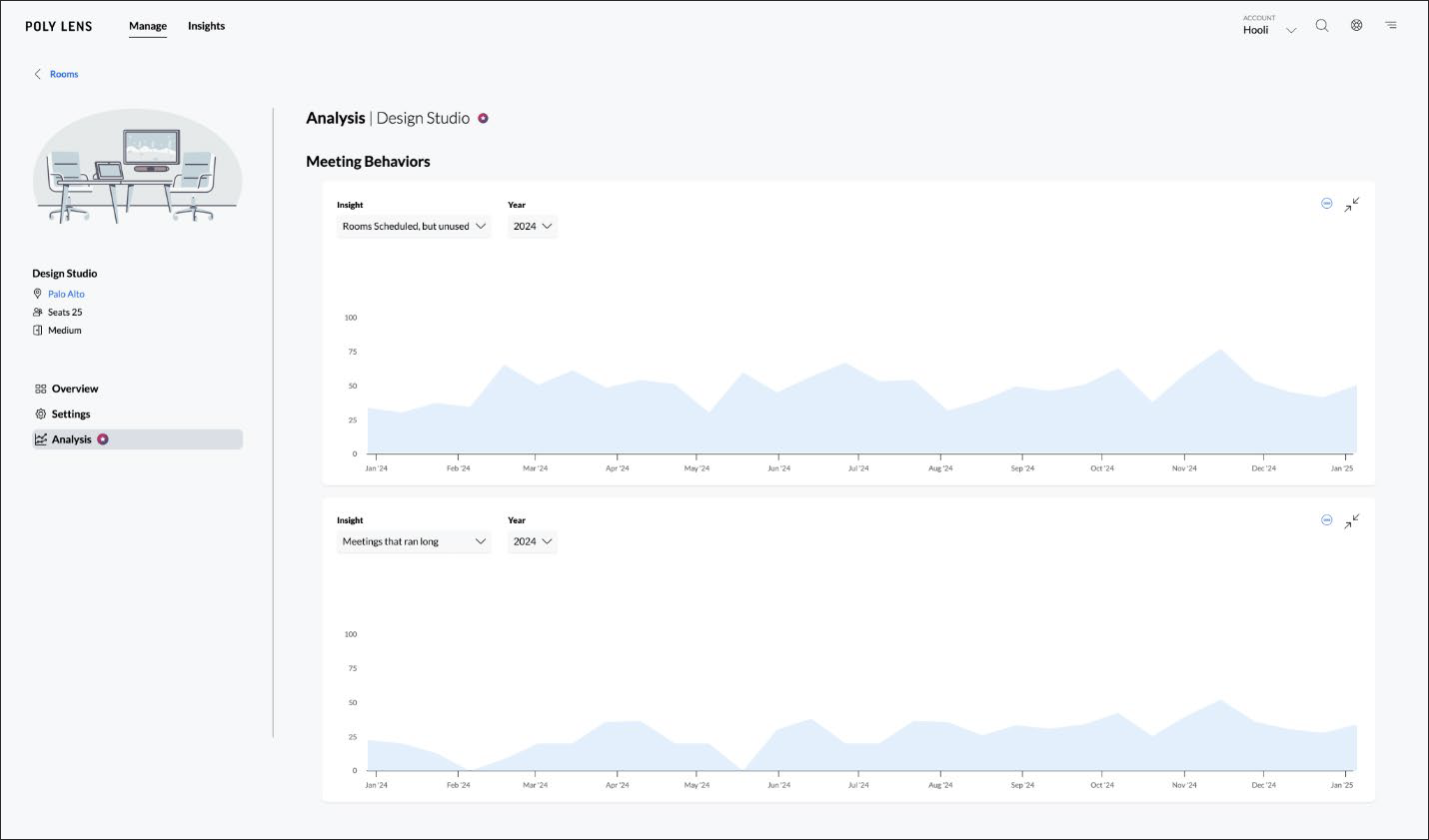
When meeting rooms are booked, but go unused, it reflects a misallocation of resources. Tracking this behavior can help you understand why meetings are being scheduled but not held. It could indicate a need for better calendar management, better scheduling practices, or maybe there is something wrong with the room. Addressing this issue ensures that valuable space and resources are utilized effectively.
Full list of Supported Meeting Behavior Insights
- Meetings that ran long: Meetings that ended after the scheduled time
- Meetings that started late: Meetings that started after the scheduled time
- Meetings that were unscheduled: Meetings that occurred in the room without being scheduled
- Rooms scheduled, but empty: Scheduled meetings that were unattended
- Rooms scheduled in a series, but empty: Repeating scheduled meetings that were unattended
Simplified Path to Meeting Behavior Insights
You can enjoy these new Meeting Behavior Insights in two sections within Poly Lens.
Priority Insights: A curtate newsfeed of your most notable insights. Find the latest insights at Insights > Priority > Rooms.
More details at Poly Lens Help - Priority Insights.
Analysis: Self-guided dashboard that allows you to filter through the data to conduct in-depth analysis on your workspace. Explore the new Meeting Behavior analytics at Manage > Rooms > (Select Room) > Analysis.
More details at Poly Lens Help - Analysis
Getting Started
-
Enabling the Office 365 Calendar Integration
To enable the integration, to go the Admin menu > Integrations, select Office 365 Calendar. Allow Access and Authenticate to your Office 365 tenant.Once Poly Lens has been granted access, we built in a bunch of neat tools to make linking your Calendars to Rooms in Poly Lens very easy.
More details at Poly Lens Help - Office 365 Calendar Overview. -
Linking Calendar to Poly Lens Rooms
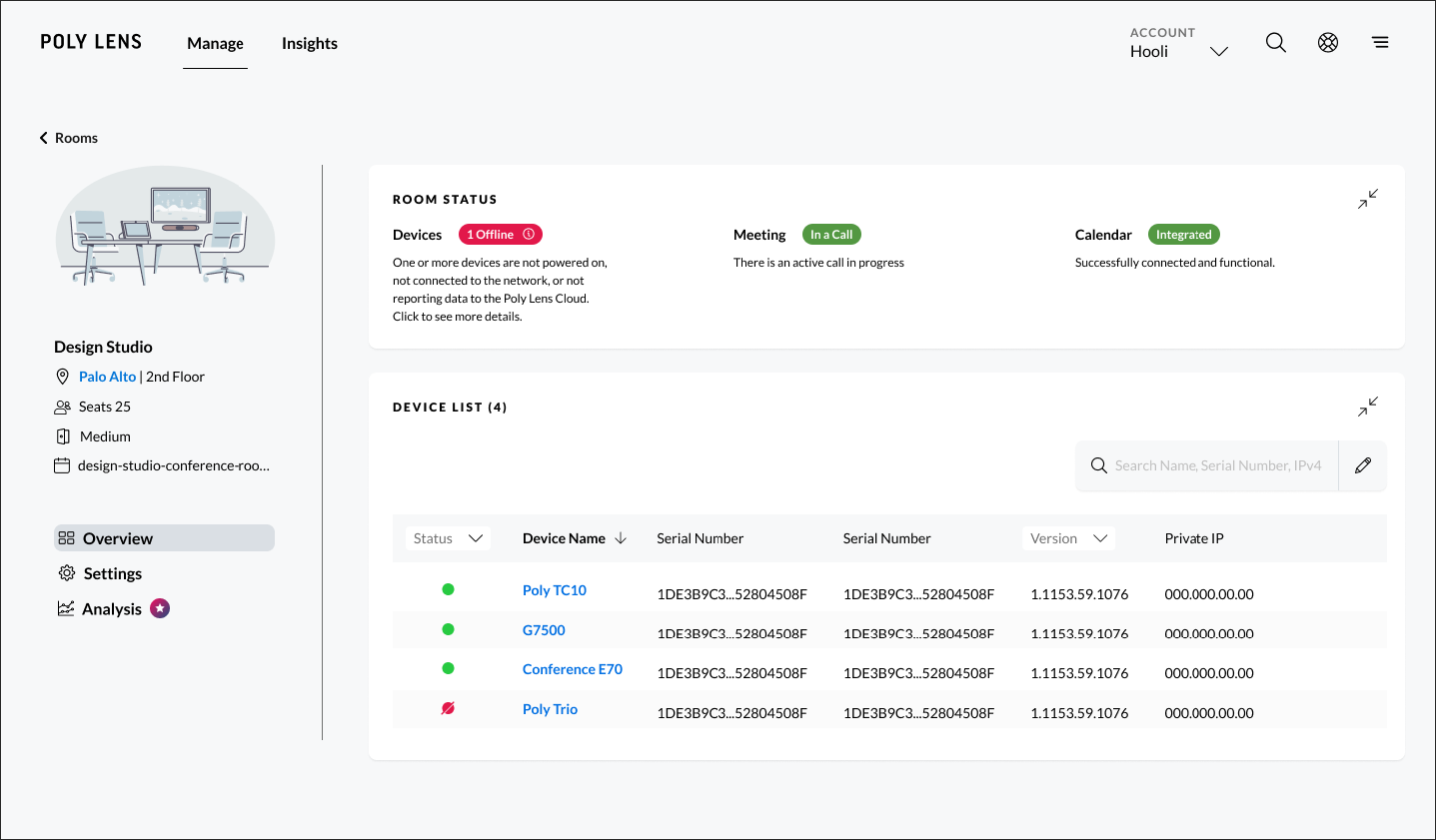
To enjoy the new benefits of this integration, it is important to Link your Calendars to your Poly Lens Rooms. To link your Poly Lens Rooms, Go to Manage > Rooms, select Add Calendar, and link your Room calendar in Room Settings. Once linked via the dropdown or typing in, the calendar will begin Syncing and then show Integrated once all calendar details are linked. Note: Office 365 Calendar needs to be enabled before linking calendars to Poly Lens Rooms.
More details at Poly Lens Help - Office 365 Calendar Room Setup. -
Monitoring Integration Status
Once you have linked your Calendars to your Poly Lens Room, we made it easy to monitor the health and status of the integration. You can view the health status of each Room calendar directly from Room Status or the Room List in Poly Lens. This near real-time visibility ensures that meeting spaces are successfully linked, and the integration is healthy. And if they are not healthy, you can understand what actions you need to take to get them healthy again.To monitor Calendar Integration, display the list of Rooms (Manage > Rooms) and use the pencil icon to display the Calendar column.
More details at Poly Lens Help - Office 365 Calendar Details.
Embrace the Future of Meeting Insights
Upgrade and access all your Poly Lens Premium Lens Features today and empower your organization with the tools needed to drive productivity, enhance collaboration, and embrace the future of meeting insights. Your journey to seamless Meeting Behavior Insights using Microsoft Office 365 Calendar starts today – let us know what you think by clicking on Feedback in Poly Lens.